The Mac Roundtable

One of the many things I really enjoyed at Macworld 2011 was watching discussions and podcasts live. Its interesting to see podcasters in person. I was looking forward to possibly meeting Allison Sheridan of Nosilla Cast. She reviewed Audiobook Builder in a couple of episodes. After the podcast, the three of us were getting anxious for food, so we didn’t stick around long enough to meet Allison. Note: I did not make that mistake when I saw Sinbad. I barreled through the crowd like I knew how to play football and politely asked for a picture together. Luckily, he was super nice about it. Yep. I was a little star-struck at Macworld.

Anyway. Keith, Randy, and I had the pleasure of sitting in the audience for a taping of The Mac Roundtable. The group consisted of already mentioned Allison Sheridan, as well as Don McAllister, Tim Verpoorten, Ken Ray, Chuck Joiner, Katie Floyd, Victor Caijao, Adam Christianson, Joseph Nilo, and John F. Braun.

The discussion was about whether or not iOS devices could take over and on what timeline. Watch it below! Disclaimer: It won’t be as fun as being there, but its still an interesting talk 🙂

In General | Leave a comment

Reviews: Cents to Share & The Simple Dollar

Though eating is a worthy expenditure, it would be nice to spend a little less on food. After breaking down the price of pancakes, I found myself searching for similar breakdowns of meal costs. A friend sent me this Lifehacker article about how to make pizza for $0.38 a serving. The article referenced two money-saving blogs: Cents to Share and The Simple Dollar.

Cents to Share

In addition to the great pizza recipe, this blog has some good advice on how to stay under your food budget. The author states, “Plan.” as his first tip. It sounds easy, but many of us struggle with the amount of planning that goes into cooking healthy, budget-friendly meals. Planning ahead ultimately leads to greater savings. Lots of foods can be purchased when they are on sale and frozen until needed. The comments visitors have shared are also very informative, and the community behind this site is refreshing.

The Simple Dollar

Chock-full of money saving ideas, The Simple Dollar began in 2006 when the author decided that it was time to change his spending habits and get out of debt. I especially enjoyed reading “Rule 7: Watch Your Progress-But Make It Fun” which gives excellent insight on what motivates us to change. Tracking your progress lets you know how far you’ve come. When we can look back on where we were and see that our current situation is better, it gives us the strength to continue to work towards change. By contrast, if you have no record of the changes you’ve made or the changes you’ve tried to make its very easy to give in to feelings of disappointment that may or may not be based on fact. Its okay to look back and realize you’ve tried things that didn’t work. Take the factual information gathered and reformat your strategy until it works.

My Two Cents

Finding balance in preparing the cheapest and healthiest food choices is important. Some of the healthiest foods are surprisingly inexpensive, but the amount of planning/prep time is a bit overwhelming if one is accustomed to whipping up meals in 15 to 30 minutes. Think of that giant bag of black beans on the bottom shelf at the grocery store. Its cheap, but those beans need to soak overnight in order to be of any use in meals tomorrow.

Adjusting your expectations of what food should taste like is a good way to eat both healthier and cheaper food. Don’t get me wrong, cooking with fresh veggies and other raw (non-processed) foods can yield some amazingly delicious results. But that usually only happens if you have all the herbs and spices a great recipe and the ability to patiently read through the recipe and stand over the food while it simmers.

Some of us are still learning to cook.

In the meantime, another strategy is to actually be hungry when it is time to eat. One of the best things I ever tasted was while running a marathon. After squishing all the gel out of an energy packet at mile 19 I licked what was left of it off my hand and thought, “hmmm, salty.” Later, I realized that part of what I was tasting was my own sweat. But it tasted like life itself!

Check out Cent to Share & The Simple Dollar for many more interesting articles!

Do you have any money saving strategies to share?

In General | Leave a comment

–Your Name Here–‘s Voice Saves Runner from Crushed Toe

Though frugal with money, one of my great luxuries is a membership to the YMCA. Each treadmill at the Y is equipped with its own TV. All you have to do is bring your own earbuds.

While I love canned laughter and makeovers as much as the next gal, for 2011 I’ve decided to replace  watching episodes of “King of Queens” and “What Not to Wear”  with classic literature.

So, I downloaded “War and Peace Book 1: 1805”  from Project Gutenberg, used Audiobook Builder to get it organized, put it on my iPod and started listening to it while I run.

If you don’t  subscribe to our quarterly newsletter, Project Gutenberg is a place to  download books and audiobooks that are past copyright. Their current collection includes thousands of books, and is definitely worth checking out.

Listening to “War and Peace” beats filling my head with sitcoms. I’m 2 hours into a five hour recording. Each chapter has a different person reading, because the readers are volunteers.  This keeps the book even more interesting.

It has come to my attention that once finished with Book 1, there is no Book 2 yet recorded!

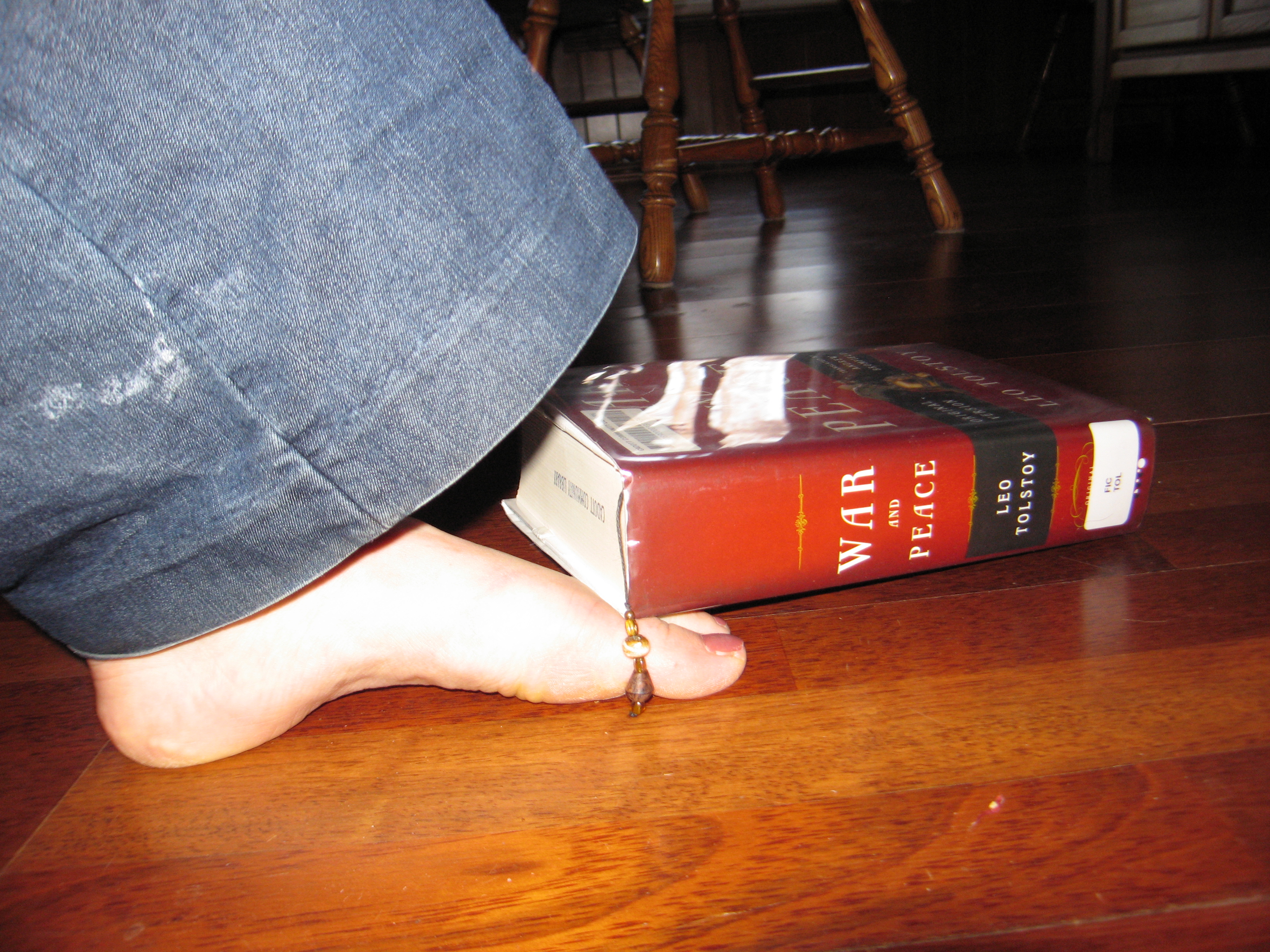
The hardcopy was available from my local library, but it isn’t safe to run with it. War and Peace is ginormous. Worst case scenario: I could drop it on my toe and suffer a debilitating limp for years to come (SEE PHOTO ABOVE). Second worst case scenario: My sweaty hands ruin it as I turn pages.

What can you do to help? Well…

Though already mentioned in our winter newsletter, I am now compelled to add that Project Gutenberg gets its audiobooks from Librivox, which is looking for volunteers to read for a public audiobook collection.

If you like to read and have a voice, put it towards a noble cause. Save this runner’s toe!

In General | Leave a comment

2nd Annual Search for Splasm

Are you great at crossword puzzles? Do you annoy friends by pointing out continuity errors in films? Can you spot a sweet, sweet deal in a sea of faces?

Find us at Macworld 2011, January 26th-29th 2011 for the 2nd Annual Search for Splasm!

Scan the crowd for three happy nerds sporting Splasm T-shirts and smiles out on the Expo floor. Hint: check out our profiles before you head out! (Even better hints on Twitter).

Once you’ve located Team Splasm, ask for your coupon to get 1/2 off Audiobook Builder, CheckBook Pro or ViddyUp!. A few lucky sleuths will even receive a coupon to get these wares for FREE. And oh yeah, ask for swag and ye shall receive.

So, Mac community, Splasm users and users to be, put your ability to spot details to good use. Come and find us!

In General | Leave a comment

Win an iPod touch!

We are looking for details on how Checkbook, Checkbook Pro, Audiobook Builder, or ViddyUp! has eased your daily life and you could qualify to win an iPod touch 4G, 32GB.

Submit a short paragraph to feedback@splasm.com like this note on December 15th: “I just wanted to drop you a line to say THANK YOU! I use Audiobook Builder just about every day and I love how easy yet powerful it is. I especially love being able to be able to add individual chapter images.” Cool!

So, tell us how you use our products for a chance to win big! What was life like before? Throw in details, like how you accomplished the same tasks, how irritating it used to be, and how much time your old process took up so readers can compare and contrast. We’ll read every submission and choose our favorite five entries. The top five will be featured on Splasmata AND their authors will win a Splasm T-shirt AND they’ll be entered in a drawing to win an iPod touch.

The top 5 will then be entered into a drawing which will take place on Tuesday, March 15th 2011. The winner will walk away with an iPod touch and a coupon for the Splasm product of your choice.

The top five finalists will be published here the week of March 7th and will be awarded a this lively T-shirt. The winner will be notified by e-mail and will be announced via Twitter no later than 2pm CST on March 15th 2011.

Submissions must be received by March 1st 2011 to be considered for the drawing. Good Luck!

In General | Leave a comment

An Easy Fix for a Common Dating Mistake

I’d like to show you a very common Mac OS X dating mistake – and how super easy it is to fix. What’s that? You don’t use your Mac for dating? Pshaw, people. If you’re letting CheckBook, our sweet personal finance manager, help manage your monies then you’re definitely – oh, wait, I meant date formatting mistake. You thought I was about to give out free dating advice, didn’t ya?

So, you’ve decided to tweak the way your Mac displays dates and found your way to the Language & Text preference pane in System Preferences.  You’ve even gone into the Formats tab, looked around and hit the Customize… button.  So far, so good. Here’s something similar to what you’ll see:

Default Language & Text Date Formats – Pay Close Attention to The Blue Around the Numbers

Now let’s say you want to change the Short format so that you get 4-digit years.  What do you do? You get rid of that “11” with the nice blue background and type in a 2011, right? Like this:

A literal year in the Short Date Format

And you’re good to go! Until…well, until you notice all the dates in all your apps are showing up with “2011” as their year, no matter what you do or how many times you try to change the dates.  It’s a little bit like you’re John Malkovich being John Malkovich.  Only not as creepy. And not as messy in the end (promise!).

But what just happened?

In the first screenshot everything besides slashes and commas had a blue background. In the second screenshot, after we typed in our 4-digit year, that little bit we typed didn’t have a blue background.  You’ve probably guessed by now:  that blue background is the key. What’s so special about it, anyway?  Well, everything with a blue background is actually a placeholder for a part of the date, like the day or the year.  Behind the scenes, when the Mac has to show you a date it looks for these placeholders and swaps in the appropriate values – but the parts of the date format that don’t have a blue background are just copied to the final date you see on your screen. When we typed in “2011” in place of the old “11”, we replaced the placeholder for the year with a literal bit of text – and now every date gets a “2011” where the actual year should be. Drat!

How do we fix it?  That’s the easy part!  First, remove the “2011” you typed in earlier. Second, look at the lower half of the window, where you’ll see all sorts of “date elements” – and they all have blue backgrounds!  Find the Year date element, which in this case is a “2011”, and drag it up to the end of your Short format, just to the right of the final slash. It should now look like this:

The Short Date Format with a proper 4-digit year

And that’s all there is to it.  You made your mistake but an easy drag and drop made everything better.  Now if you want to take this dating thing to the next level…take some initiative and see what happens when you click on the date elements that have little white triangles in them…

In General | Leave a comment